Client Portal
Check our 5 minute video on how to set up and use the client portal in Circle-Hand.
Written By Max
Last updated Over 1 year ago
FAQ
Seller created an account, but I can’t see the profile in my client list
Seller created an account, but I can’t see the profile in my client list
Sometimes sellers don’t sign up via your personal client portal URL and create a store account instead. To avoid this make sure you send the client portal URL.
If this happens: they can create store, logout and use the correct URL and register with another email address. You can send us their e-mail address and we will manually delete it, so they can create a client account.
(Outlook, Hotmail) Sellers are unable to sign in / see link is expired
(Outlook, Hotmail) Sellers are unable to sign in / see link is expired
In most cases, this happens with Microsoft Outlook accounts (live.com / outlook.com / hotmail.com)—they have a Safelink feature that clicks on all links in emails before they are delivered. You can ask them to disable this feature by going to the settings in Microsoft. Here is how to do it.
If it still doesn't work, please send us their email address and we will look into it!
(Gmail) Sellers are unable to sign in / see link is expired
(Gmail) Sellers are unable to sign in / see link is expired
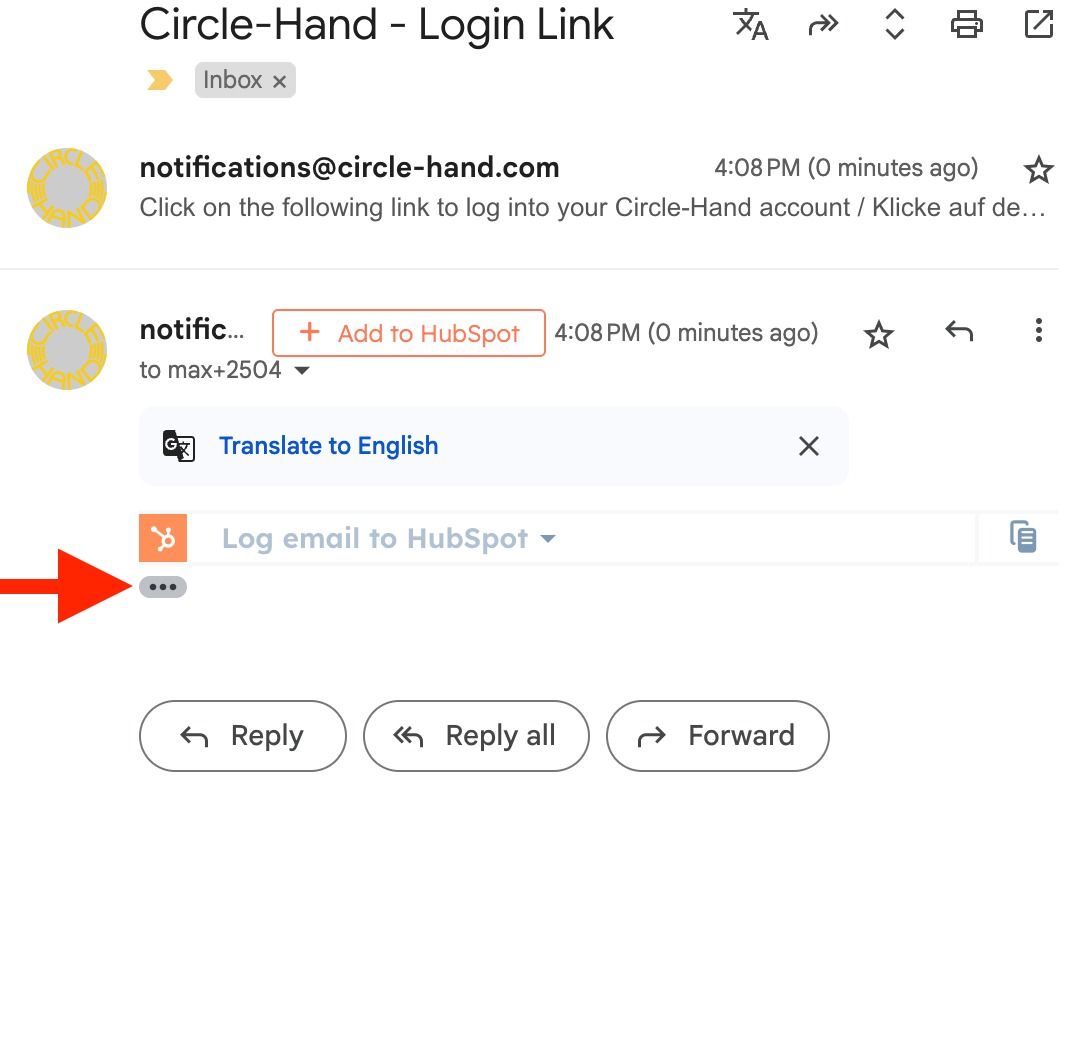
Gmail sometimes summarizes the login emails. Here is how you can get to your client profile:
1. Open the client portal link.
2. Enter your client portal email (it must be different from your store account email).
3. In Gmail, open the latest login email and click on the three dots to expand it.
4. Follow the link to your client profile.
Still need help? Ask the team